Category Archives: UX

Wireframes and Personas

Image: Gayatri S

Image: Gayatri S

These past few months I have had the opportunity to do freelance work with a few different agencies and have had wildly different experiences. One thing that becomes clear is that, while UX is a buzzword and many clients seem to want it, many agency heads (account executives) don’t really understand what it is. And now the buzzword has changed again: “Lean UX.” This makes it more complicated, because UX itself is so poorly understood that adding a modification complicates communication all the more. I’ll attempt here to clarify a bit.

“You do wireframes, right? Because our clients expect wireframes.”

One of the main obstacles facing many agencies incorporating UX into their process is the idea that design deliverables are the only evidence of billable time. I can’t tell you how many times I’ve been on a team of designers who worked hard to making an initial iteration of a comp pixel perfect; it’s the industry standard and clients rightfully expect it, especially with deliverables destined for print. When we apply this expectation to web work it makes less sense (browser and device differences being among the chief factors), and when applied to UX tools such as wireframes it makes none whatsoever. Since UX has popped onto the client radar, the expectation is that wireframes comply to the same exacting strictures as design deliverables.

This somewhat defeats the point of using wireframes at all, since if one is going to wireframe in Illustrator or Fireworks then one may as well be designing instead. Clients see these documents and focus on visual specifics rather than functionality. This also holds true to a lesser degree for personas and taskmaps, other crucial tools for a user experience designer. This is not to say that aesthetics are not a very important part of UX; they are, but they don’t apply to wireframes.

Wireframes function as a point of reference that will allow quick collaboration between the business strategist, the interaction designer, the developer and the graphic designer. they can come in different flavors from napkin sketches to fully interactive simulated sites. The idea is that you can test the way the interaction actually functions.


The great thing about using a tool such as Axure is that you can do a pretty good of showing how the site will actually function and be able to demonstrate and test it… all without needing to involve your development team. A wireframe interface  is easily modifiable, too. If something doesn’t work, it is easy to change it.

So what exactly ARE we delivering?

My experience has shown me that user experience design benefits from using a programmer’s mentality of asking first what it is we’re trying to do. As a UX designer, my questions are simple:

1. Who is the user and what are her priorities?
2. What does the user want when she uses this tool, website, or app?
3. What does the business want her to do?
4. What is the best way to address of these needs simultaneously?


Where do personas fit into this?

Right at the beginning, because personas are the tool that we use to keep us on track. But what are they?

First, what they’re not:

Personas are not a demographic. They aren’t  a segment or a group, though that’s where they start.  Really, a  persona is a fictional, yet accurate, depiction of an actual user. The goal of a persona is to humanize the target audience so we can better understand their motivations and behaviors and how they will interact with the interface. We need to know who these people are and what they want.

In reality, personas should be the locus of the entire development process because they ensure that we are designing for the user, not themselves. Personas will create alignment on this key point.

That’s all well and good, but how do we know? Often, businesses think they know their customer through and through. Often, they are wrong. They forget the all-important fact that they are not their customer.

Ideally, the process of creating personas typically begins with baseline demographic information that provides known demographic data with quantitative insights to identify core similarities and differences. This will divide the audience into segments.

Then, that information is sifted further by using third-party research tools to start identifying individual characteristics based on demographic and other factors.

Once the differentiating factors between the various individuals are fully identified, we are in the position to form some hypotheses about  our users. We might find that certain of them only interact with the site at night and draw some conclusions from that. These conclusions need to be confirmed of dis-proven by actually talking to real users. This can be done with surveys, emails or face-to-face interviews.

The final validation is achieved by conducting more extensive interviews with subjects who closely match the personas. Such individuals can also be used for user tests on existing interfaces for the purposes of auditing websites and competitor analysis as it affects the core of the target market.

The end result is typically three to five individual personas that I humanize. Each persona contains a name and picture along with an extensive background (including city, job title & salary, marital status, age, race, family, etc.), prime motivators, expectations, buying patterns, technology patterns, pain points, favorite brands…in short, a well- rounded look into the specific factors that may come into play when the user engages the product.

Realistically, this can’t always happen. In fact, I’d go so far as to say that only a tiny portion of personas are grounded in the kind of research that’s really required. It’s expensive and time-consuming and usually the client doesn’t want to spend for it because they believe that the research is enough.

It’s not, for one key reason:

Research is not a design tool. Personas are, and by using them in every case we ensure that we are not designing for ourselves. 

So what’s usually done are proto-personas.  These start with some quantitative research by marketing firms such as Forrester and are essentially fleshed-out versions of the demographic. In-house subject matter experts and business owners can help confirm hypotheses and help personalize the personas. I have found LinkedIn and my own personal network to be a great use in confirming a hypothesis that is shown in the big-picture research. Quick emails to people I know who match the target can help, as can a phone or face-to-face conversation. Most recently I was working on personas for a pool table manufacturer and talked about the tables with my barber, a pool enthusiast. There are ways to do that don’t involve the sticker shock of full-on process.

And getting 80% of the way there is a lot better than having nothing, or worse: a bunch of wholly fabricated stuff.


Adaptive vs Responsive Design

When I got my start in Web design back in the late 1990s, there were a lot of buzz words being bandied about by marketing and sales staff, words that they didn’t quite understand. This is the nature of marketing and sales, after all: promise, assure and close the deal. Unfortunately, I was always on the part of the team tasked with fulfilling the promises, and this didn’t always go as planned. The oft-quoted stale joke in those days was “The first 90% of the budget and time goes toward creating the first 90% of the code. The remaining 10% of the budget and time goes toward creating the other 90% of the code.”

Part of the problem is the inherent disconnect between what is promised and what is possible. You hear a lot about “best practices,” but really, what do they mean by that? Preferred practices? Profitable practices? The truth is that there really are a set of best practices, the determination reached by research, trial-and-error and real world experience.

One the latest of the buzzwords is “adaptive.” Another is “responsive.” As these two approaches cut directly across the UX hawse, I have been searching for a succinct way to describe these in terms that even an aggressive marketing guy can understand.

Igor Faletsky, CEO of Mobify, contributed a recent column to Wired’s Webmonkey that addresses this beautifully. I’ll include it here:

The Two Flavors of a ‘One Web’ Approach: Responsive vs. Adaptive

You’ve probably heard people say we’re living in a “post-PC world.” What does that mean for web developers? It means that 30% to 50% of your website’s traffic now comes from mobile devices. It means that soon, desktop and laptop users will be in a minority on the web.

How do we deal with this tectonic shift in user behavior? We’ve moved beyond the era of m-dot or t-dot hacks, into one where responsive and adaptive design techniques rule the day — what the W3C calls a One Web approach. The key part of the W3C’s recommendation is that “One Web means making, as far as is reasonable, the same information and services available to users irrespective of the device they are using.”

For developers that means that taking a One Web approach ensures that not only does your site work on the smartphones and tablets of today, but it can be future-proofed for the unimagined screens of tomorrow.

There are currently three popular approaches to developing a One Web site: using a responsive design; client-side adaptive designs; and server-side adaptive designs.

One is not better or worse than the other; each has its own strengths and weaknesses and the wise web developer will consider the benefits and drawbacks of each before picking the one that works for their next project.

Responsive Web Design

Responsive web design is the most common One Web approach. The approach uses CSS media queries to modify the presentation of a website based on the size of the device display. The number of responsive sites is rapidly increasing, from the Boston Globe to Disney to Indochino.

A key advantage of this approach is that designers can use a single template for all devices, and just use CSS to determine how content is rendered on different screen sizes. Plus, those designers can still work in HTML and CSS, technologies they’re already familiar with. Additionally, there’s a growing number of responsive-friendly, open-source toolkits like Bootstrap or Foundation which help simplify the process of building responsive sites.

On the other hand, there are few shortcuts to a sound responsive design. To go responsive, organizations often have to undertake a complete site rebuild.

The design and testing phase can be quite fussy, as it can be difficult to customize the user experience for every possible device or context. We’ve all seen responsive site layouts that look like a bunch of puzzle pieces that don’t quite fit together. Responsive web design works best in combination with a mobile-first approach, where the mobile use case is prioritized during development. Progressive enhancement is then used to address tablet and desktop use cases.

Performance can also be a bugbear for responsive sites. At Mobify, we recently completed an analysis of 15 popular responsive e-commerce sites. Among these sites, the home pages loaded an average of 87 resources and 1.9 MB of data. Some responsive pages were as big as 15MB.

The numbers are that high because a responsive approach covers all devices. Your user is only using one device, but they have to wait for all of the page elements and resources to load before they can use it. Put simply, performance affects your bottom line. On smartphones, the conversion rate drops by an extra 3.5 percent when users have to wait just one second. By the three second mark, 57 percent of users will have left your site completely.

While responsive design is fast becoming the de facto standard, it also creates new challenges for online businesses, including how to handle images, how to optimize mobile performance and often means sites need to be rebuilt from the ground up with a mobile first approach.

Client-Side Adaptive

Adaptive design builds on the principles of responsive design to deliver user experiences that are targeted at specific devices and contexts. It uses JavaScript to enrich websites with advanced functionality and customization. For example, adaptive websites deliver Retina-quality images only to Retina displays (such as the new iPad) while standard-definition displays receive lower-quality images.

There are two approaches to adaptive design — one where the adaptations occur on the client side, in the user’s browser, and another where the web server does the heavy lifting of detecting various devices and loading the correct template. Examples of client-side adaptive sites include Threadless and ideeli. One of the strengths of the adaptive templating approach is the ability to reuse one set of HTML and JavaScript across devices, simplifying change management and testing.

A client-side adaptive approach means you don’t have to rebuild your site from the ground up. Instead you can build on existing content while still delivering a mobile-responsive layout. For expert developers, this approach also enables you to specifically target particular devices or screen resolutions. For example, for many of Mobify’s online fashion retail clients, 95% of their mobile traffic comes from iPhones. Client-side adaptive means they can optimize specifically for Apple smartphones.

Unlike responsive design, adaptive templates ensure that only the required resources are loaded by the client’s device. Because device and feature detection is shifted to the mobile device itself, CDN networks like Akamai and Edgecast can use most of their caching functionality without disrupting the user experience.

The client-side adaptive approach has a higher barrier to entry than responsive design. Developers need to have a solid grasp of JavaScript to use this technique. It also depends on a site’s existing templates as the foundation. Finally, because the client-side adaptations are a kind of layer on top of your existing code base, you need to maintain them as your site as a whole evolves.

Server-Side Adaptive

We can achieve the server-side adaptive approach in a variety of ways, through server-side plugins and custom user agent detection. Sites that use server-side adaptive include Etsy, One Kings Lane and OnlineShoes.com.

Why choose server-side adaptive? It typically offers distinct templates for each devices, enabling more customization, and it keeps device-detection logic on the server, enabling smaller mobile pages that load faster. Additionally, there are numerous server-side plugins available for common CMSs and eCommerce systems such as Magneto.

This approach isn’t for the faint of heart–it typically requires significant changes to your back-end systems, which can result in a lengthy (and costly) implementation. The requirement to manage multiple templates raises ongoing maintenance costs. Finally, this approach can encounter performance issues when servers are under heavy load. When mobile user agent detection is performed on the server, a lot of common caching mechanisms deployed by CDNs like Akamai need to be turned off. This can result in a slower user experience for mobile and desktop visitors.

Of course, many companies are still wrestling with the basics of responsive, and they’re not ready to confront the more sophisticated flavors of adaptive. Increasingly competition and mobile traffic, however, will drive more and more organizations to kick the tires on all three approaches, and pick the one that works best for their users.

Thoughts on UX and the NYC Subway

Fig.-3-79-orig

I recently returned from a trip to New York where I had a chance to use the subway system pretty extensively. As a UX guy, I’m always looking for good user experiences in unlikely places. The subway system was a really good lesson, because it, like many of the projects I work on, has several elements that make the user experience particularly difficult to orchestrate. For starters:

  1. A huge variety of different users with an enormous range of priorities, skills and comfort levels
  2. A wide variety of different interfaces to choose from
  3. An environment that is often confusing with little consistency in feedback
  4. High penalties for mistakes
  5. Time constraints
  6. Support of legacy interfaces and environments

Let’s take a quick look at the first one:

1. A huge variety of different users with an enormous range of priorities, skills and comfort levels

On the same train I noticed students, parents with young kids, experienced (albeit jaded) subway commuters, shoppers, non-English speakers, homeless, teens, tourists, etc. Initially, they had the same general goal: go somewhere within the five boroughs. They walk down a flight of steps into the tunnel. After this, we begin what will be a lengthy process of divergence. As with any diverse user base, this gets very complex very quickly. For instance:

metrocard

This is the level of complexity before the user even enters onto the platform. They are just buying the card. Because you need a Metrocard to ride the subway, this is somewhat simplified (although there is a separate set of tasks specific to the machine).

At this point, we need to begin segmenting the users. Assume two main segments of commuter or tourist. What kind of commuter? Rush hour office? Student? Jazz musician carrying a double bass or a drum kit? And what kind of tourist? English speaker? City dweller from another urban environment? And with these users, what is the priority? A tourist may be in a hurry, or may be feeling panic because they feel unsafe. A commuter might be exhausted and afraid of falling asleep (and winding up in Coney Island, a not-uncommon occurrence.)

The solution to this complexity can be found in the way the way the fares are handled: find a way to meet as many needs as you can with a simple solution. The Metrocard machines take both credit cards and cash (bills and coins). They do not take foreign currency, although NYC is an international city and many foreigners use the subway. Nor are legacy currencies supported (such as subway tokens). There is no cash option at the gates, either. The majority of the users’ needs are met by making certain some constraints are universal.

Once on the train, we start seeing how the different user priorities begin affecting their actual experiences. Let’s take a short persona of a tourist as an example:

MILDRED AND JIM

  • From Topeka KS
  • Visiting daughter Emily in Williamsburg
  • Want to see the Statue of Liberty
  • Have been to NYC in the 1970s, but not since

Seeing this short persona set, we can surmise a few details about what their primary concerns might be:

  • Not from a big city, so they may be intimidated
  • Have an idea of what they want to do that is based on a preconceived idea
  • Previous experience of the city markedly different
  • Worried about safety
  • Worried about getting lost

Because they visited during a time when the subways were indeed dangerous, they may still carry this preconception with them throughout the experience despite the visual evidence to the contrary:

This is what they’re thinking

1CBXT

even though they actually see this:

So, there are some things that these users might want to see. Regular announcements of the stations, a clean and graffiti -free environment, easy-to-read maps… these would all go a long way to helping them overcome the preconceptions and make their experience more enjoyable and useful.

When we go back and look at our list, we find that these improvements go a long way toward addressing many of the concerns:

  1. A huge variety of different users with an enormous range of priorities, skills and comfort levels
  2. A wide variety of different interfaces to choose from
  3. An environment that is often confusing with little consistency in feedback
  4. High penalties for mistakes
  5. Time constraints
  6. Support of legacy interfaces and environments

The various users, of course, will need a rudimentary knowledge of English if the train information is verbal, but this could be remedied by a simple visual interface. Also, many of the riders wear headphones and need visual feedback. The visual display would need to be high enough so that even when the cars are crowded they remain visible. They need to be simple enough that anyone can understand them.

The current system is a mess, with a combination of maps, announcements (over bad speakers so garbled you can bare hear them), text displays that are great if you read English and… best of all… a simple route map with the stations plainly marked, lighting up as you go (the only drawback being that you can only see a few stations ahead and behind).

As always, it’s the understanding of the users’ needs and emotional context that will show the path toward a good solution.

Lastly, let’s not forget about this:

When User Interfaces Fail

I came across this today, and rather than paraphrase or link to it I thought I’d just paste it in (credit and link included.) This was done in 2004, the stone age of UX. I recall trying to convince huge companies that user experience went far beyond usability and was absolutely necessary. Unfortunately, these entreaties fell on deaf ears since the then-largest company in the world didn’t give a hoot about usability. And where is Microsoft now? Apple proved it… UX and CX can turn the fate of a company around. Facebook, which differed from MySpace in its interface inflexibility (no custom pages, whereas MySpace had all sorts of customization options), triumphed with its emphasis on functionality and immediacy. Any thoughts?

Some people like to do “designer bashing” from time to time. I was just in the mood to do some “developer bashing” today.There are a number of reasons why user interfaces of many software packages fail. I assume (slightly unfair and inaccurate), that in many cases there is no interface designer involved with user interface development, but rather the interface is designed by the application developers.


Here is a list of (some) common fallacies of some developers in regard to user interface design:

Fallacy #1: User centered design approach is optional.

Some developers actually have no idea what “user centered” actually means (as many consider the implementation of software that users can interact with already as being “user centered”). Also, the most important aspect of user centrism to developers is the feature list, because the features describe what the user could do. The actual ability is a function of a) the features and b) the capability of the user. What is not agreed on many times is that “capability” is not solely an attribute of the user, but is constituted by user experience level plus interface design. The 80/20 rule is applied as 80% application development and 20% interface development instead of the other way around (and in the order “first interface then application”).

Fallacy #2: Features are more important than usability.

For some developers the loss of features during planning phase seems to be a too big tradeoff in comparison to a “minimal” usability improvement.

Fallacy #3: “Design” is just an emotional and subjective quality.

Some developers think a “design” will just become necessary if the application should not only work, but also please and delight. While “likeability” is an important aspect, it is heavily underestimated how much users dislike software that is hard to use.

Fallacy #4: Functionality is what the user could do.

Some developers consider “functionality” being an aspect of the software. In fact “functionality” is an attribute only present in the usage context – where the user is the most important variable. Functionality is not what the software provides, but what the user is able to use. Microsoft Word may have many thousand functions which most users are unable to use. So the functionality of MS Word for users is what they can actually (and not potentially) achieve.

Fallacy #5: Personal experience is the best advisor.

Some developers often think they are able to do “cognitive walkthroughs” on behalf of unexperienced users. While this is a possible approach, many developers (that usually are power users with deep knowledge about the application) do not go far enough when defining “unexperienced”. When doing cognitive walkthroughs many developers keep the same mindset about what is important inside the application. Really unexperienced may consider completely different things as being important.

Fallacy #6: Good application design is the primary determinator for good interface design.

Most developers are interested in designing the application (that’s why they call themselves “developers”). Interface design is an uncomfortable requirement to be added to the application design. While there is much truth in the idea, that well designed applications often offer cleaner approaches to interface design, it is a false conclusion, that a well designed application will necessarily lead to a good user interface.

Fallacy #7: It’s OK to reject major changes of the application for minimal interface design improvements.

Well, sort of. Most of the time it is basically a matter of a wrong design approach in the first place. There is also a persistent understanding of developers that interface design issues do not interfere with the deeper application design – which is simply ignoring the fact that in most cases it remains to be the case.

Fallacy #8: A bad user interface alone cannot set the seal on the fate of the application.

It seems to be irrational to developers to prefer going with no software and unresolved problems instead of trying to work with a hard-to-use application. Unresolved problems can often be deferred or ignored – or – other workarounds could be tried with an easier path to a less optimal solution.

What the heck is CX, anyway?

Customer Experience, or CX,  is the study of how customers relate to brands, products and businesses on emotional level. It’s being hailed as a “new discipline,” but CX has been been around a very long time.

Take, for example, department stores. These early pioneers of customer experience found that displaying their goods in a beautiful environment did more than merely showcase the wares; opulent surroundings made the customers behave differently. If   a customer was  in a palace, that customer was likely spend more money… and enjoy himself or herself doing it.  Because of this discovery, department stores came to resemble miniature palaces and offered generous credit terms and liberal return policies to facilitate liberal spending.  Increased competition also spurred the merchants to offer various premiums, some of which are still enjoyed today. Where would Christmas be without the Macy’s Parade or the ubiquitous depart store Santas? You can see customer experience alive and well in any men’s department that is decked out with wood paneling and armchairs. Although Nordstrom and Nordstrom Rack sell identical merchandise, the Rack’s warehouse-like environment conveys none of the branded splendor experienced in the flagship stores. These stores function as a semi-branded clearance outlet, offering a deliberately shabby customer experience that drives home the emotion message that the shopper is getting a great deal. It’s still Nordstrom, but a cut-rate one.

These stores learned, too, that loyalty could span generations and affect whole families. My grandmother knew certain New Yorkers more divided by the Macy’s vs. Gimbels  rivalry than by politics. You could forgive Uncle Herbie for being a Communist, but not for shopping at Macy’s.

The auto industry knows something about opulence and brand identity… make the customer feel like a big shot and suddenly price is not as much of a factor. General Motors knew this when they began buying up small, independent manufactures and rolling them under the same umbrella. A man’s first car is a Chevy and his last is a Caddy. Brand loyalty for a lifetime… or longer. You are what you drive, and money is only one of the considerations. This became all the more prevalent with the immense profitability of auto financing options.

Customers are loyal to brands they value. And value is far, far more than cost. It’s more than build quality, it’s more than materials. Value is, in essence, an emotional satisfaction of money well spent. Value is a “tangible intangible.” You know value when you see it, and the owners of brand names will go to any lengths to protect that value.

Restaurants, too, have long championed customer experience. Food, location, décor and service all play important roles in whether or not a restaurant succeeds, but there are often other intangibles at work.  Loyal restaurant customers will endure long lines, poor service and wrong orders if they perceive that experience of dining there is valuable. Sometimes  that can be because of a good review, but more often it’s word of mouth from other customers who have crossed over from loyalty to sheer evangelism. Food is food, but some experiences are more valuable than others. Anyone who has dined at an exclusive Manhattan restaurant will tell you the same.

But some restaurants have wild success while many others fail. (While not nearly as drastic as is commonly believed, 65% of new restaurants fold up within three years of opening.) The food may be equally good, the staff equally efficient, yet one place will thrive while another shutters. It certainly isn’t because the owners want to fail, nor is it because they are unwilling to give the customers what they want.

It’s because they simply don’t know. Customers will stop coming in, and the reason will elude the owner all the way up to the bitter end. It may be the parking lot, it may be the bar. By the time the owner starts wondering, it is often too late. The point is: if you don’t pay attention, you won’t know that you are failing until you fail.

Let’s take the greatest success story in recent years as a case study. You know who I mean: Apple. Apple did the impossible and not only came back from near extinction, but did so in a market that was completely dominated by a competitive monopoly. It achieved this through its innovative use of customer experience management. Every aspect of the Apple customer experience was designed and refined, from the screws used on the computer cases to the online store, from the type of metal on an iPod to the color of glass in the windows of the Apple Store. Steve Jobs was known as a detail man, but more importantly he was fully aware that attention to detail alone was not enough; it was absolutely vital to determine what the customers felt about the products. Jobs knew that emotions can overrule almost any other aspect of human interaction, even when it comes to technically-oriented decisions such as buying a computer or music player.

In an upcoming article I will address some of the “touch points” that can be monitored and refined to help improve your customers’ experience both on your website and your physical store. In the meantime, feel free to contact me at josh@grapnel.net with any questions or comments. You can also read a bit more about this at http://grapnel.net/cx.html

What Being Social is All About


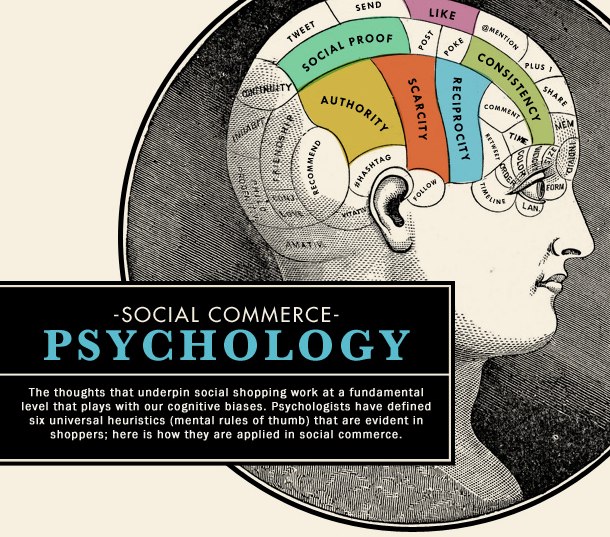
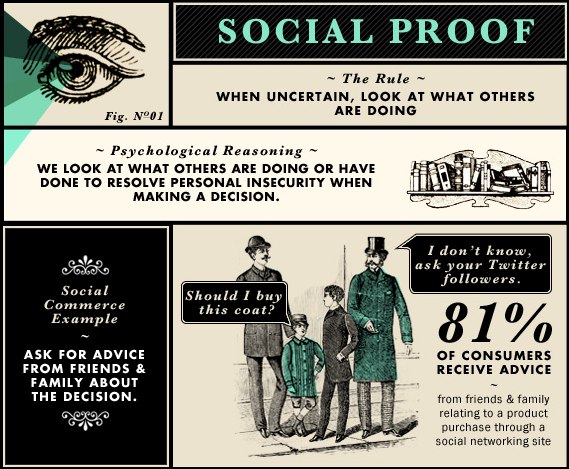
I came across these cool graphics on theFast Company website. The accompanying article is really wordy and sort of reminds me of a Power Point presentation where the dude reads off the slides for the whole meeting. This meeting was brought to you by the Department of Redundancy Department. The slides are self-explanatory and lovely to look at.


An Interactive Tragedy Part 1

Several years ago I worked for a marketing firm that specialized in print for a well-funded, loyal niche market. Agency X had it locked up…  the sales force was recruited straight from the target industry and were well-connected, the loyalty factor in this industry was very high, and the methodology was tried and true. Best of all, the profit margins were astronomical because the actual cost of producing the deliverables was a fraction of the billing. The methodology was a simple ad agency boilerplate:

  • Account executives would set up the appropriate appointments
  • They, along with the creative team, would conduct discovery interviews
  • They would produce what they called a “discovery document” that talked about the nature of the the business as it related to the campaign
  • The document would be presented and then go through some revision cycles until final approval was given
  • The creative team would be dispatched to create assets such as logos, photos, etc. Copy and taglines would be written. At some point focus groups might be used, but more often than not approval was up to stakeholders
  • Final approval of the project, production and delivery.

This model worked fine for branding and printed material. Advertising could also be engaged, as well as video production for message-based commercials.

And then what happened? Somebody mentioned the website. Can Agency X also do our website?

Sure, said the agency. We’ll just hire some web designers. We can launch this site based on the campaign. It will be great.

And they did just that…  Web designers were brought in, billings were increased and everything was hunky dory until one day a client got a look at another agency’s work, an interactive agency’s work, for a competitor. Remember, this is a niche industry, and an insular one at that. The client, being loyal, asked the account exec at Agency X why this competitor’s website was so superior when they were paying Agency X top dollar.

Um.

Thus began a long and disastrous attempt to educate the account executives about the vast differences between interactive media and its more traditional counterpart. The thing that was hard for them to grasp was the fundamental difference between traditional and interactive media: the user. In interactive media, the user needs to be included in the earliest conversations. A new role was defined to help facilitate this inclusion. Enter the interactive strategist.

Right from the beginning there was trouble.

So a guy walks into an office and offers UX services…

Doing a first-time UX consultation, I sometimes feel like an auto mechanic walking into a buggy shop circa 1905 and trying to tell the carriage maker that the horses will soon be outclassed. It’s hard to consult from a defensive position, even when the writing is on the wall that things are changing. The main issue is that the service I offer is often seen as either redundant to current efforts or entirely unnecessary… or even nonexistent.

Even with the prevalence of social media in our culture and the fact that customers are becoming extraordinarily sophisticated in their methods and ability to access online media, there still remains a level of disconnect. The old methodologies of dealing with customers is amazingly stuck in the past. It is often driven by the marketing department and utilizes communications techniques used in traditional advertising. The message is broadcast, the results are monitored and changes are made to correct any missed opportunities. Analytics suites and lead tracking software have added useful tools to find and collate information,  but the the overall method itself hasn’t changed in its basic philosophy. One thing that has changed is the speed with which a customer or user can change direction: one click and they are gone, usually for good.

This isn’t because businesses don’t want to change. The technology is everywhere… most people carry a computer in their pocket that is much  more powerful than the most expensive desktop machines of ten years ago. The relationship businesses hope to have with customers through these new devices is clear, but the method being used is, at its root, one-sided.

Brian Solis of Fast Company Magazine wrote in a recent article :

“Rather than examine the role new technologies and platforms can play in improving customer relationships and experiences, many businesses invest in “attendance” strategies where a brand is present in both trendy and established channels, but not defining meaningful experiences or outcomes. Simply stated, businesses are underestimating the significance of customer experiences.

…As smart and connected technology matures beyond a luxury into everyday commodities, consumer expectations only inflate. As a result, functionality, connectedness, and experiences emerge as the lures for attention. For brands to compete for attention now takes something greater than mere presences in the right channels or support for the most popular devices. User experience (UX) is now becoming a critical point in customer engagement in order to compete for attention now and in the future. For without thoughtful UX, consumers meander without direction, reward, or utility. And their attention, and ultimately loyalty, follows. “

It comes back to the simple questions that businesses need to be asking:

  • Who are your customers?
  • Why do they like you?
  • How do they buy from you?

One problem is that marketing departments often believe they know the answers to these questions, but when pressed will admit that there is little empirical evidence to support their beliefs. Creative campaigns are often based on clever concepts, but don’t incorporate engaging experience design. Sometimes this can pay off and a campaign will be incredibly successful, but sometimes it can bomb. It need not be random because a clever idea can be paired with an engaging experience every time…  but only if  it is designed that way from the start.