Author Archives: Joshua Carroll

About Joshua Carroll

The UX voice crying in the wilderness, but glad that it's getting better all the time.

The Eight Worst UX Mistakes

The 8 Worst UX Mistakes

by  Piotr Koczorowski

Have you ever asked yourself what UX is all about? It’s about learning from mistakes. You can build a design around the idea of turning bad experiences into good ones.

We tend to follow the core principles of UX design, but sometimes they slip designers’ minds, and it leads to mistakes that are becoming an integral part of most projects. If UX were treated as linguistics, I would say they no longer are mistakes — they became UX errors.

To locate these errors, I reached out with the question ‘What one UX mistake on websites drives you crazy?’ to the following UX experts in the field: Paul Olyslager, Frank Gaine, Brad Frost, Stephen Hay, Andy Budd,Molly Wolfberg, and Heydon Pickering.

Here is the list of 8 worst practices in UX design.

Expecting the unexpected

Paul Olyslager

What one UX mistake on websites drives you crazy?

The unexpected. Performing an action (e.g. clicking a button) that does not result in a way I have thought it would.

Paul Olyslager, UX Manager at Nu3 shared with us one of the core reasons for all bad user experiences — the unexpected. Have you ever been irritated with something that works opposite to your expectations? Many websites have this problem, when their users don’t know exactly what to do.

The creator of a hilarious website Webpages That Suck, Vincent Flanders, addressed this issue and coined in 1998 the term mystery meat navigation, which means designing webpage elements in such a way that they do not communicate their purpose — just like overprocessed food.

Life shows it still happens. One of UsabilityTools’ clients was a mystery meat butcher in navigation. Their front page featured an area, which had elements posing as call to action buttons asking people to Register Now. Through a click tracking study, they saw that people clicked on them too often, while the buttons didn’t do anything.

24% of these clicks did NOTHING.

That made people quit the site, since they assumed it is broken. After changing the buttons into clickable ones, their conversion rate went up by122%. A small usability fix, but influential.

Luke Wroblewski, an expert in mobile environments, mentions another abomination of unexpected design: The meat tornado.

Hamburgers and kebabs in mobile are the Jessie and James of UX design — prevalent and annoying. Luis Abreu describes how distasteful hamburger menus are. They were supposed to be the fast food of navigation. However, they became harmful to our designs, as users are ignoring them and therefore do not discover all options.

Be clear. Make sure that every item in your project has a purpose, and that it communicates its purpose immediately.

You spin me round

Frank Gaine

What one UX mistake on websites drives you crazy?

Those ‘Top 20′ websites, where you have to click a Next button and refresh the page to see each item in the list. Grrrr. They should just do a big long list on the one page.

Are you dizzy when you browse the web? I sure am. The growing abundance of clickbaiting pagination makes many nauseous.

They exist to get more clicks and the page views. A terribly cheap way of exploiting your users. A dark pattern in web design. But it’s not the only one.

Brad Frost speaks of the bastard child of the merry-go-round family — carousels. They are supposed to bring “fun” to the user. However, they are badly executed, causing confusion and misinformation. Because of that, people tend to skip them.

The website Should I Use a Carousel? provides you with the best answer whether you should use it.

If you need stats telling you why carousels are bad for your website, According to Harrison Jones from Search Engine Land, sliders are bad for both usability and SEO.

Remove image sliders, carousels, and clickbaiting pagination. Be clear andhonest, as no one wants to struggle with the dark side of web design.

Immobile pages

Stephen Hay

What one UX mistake on websites drives you crazy?

When I follow a link to your site on my phone, and I can only get to the content if I ‘download the app’. I’m not going to download the app.

Many a time upon entering a webpage was I greeted with a lovely message on my phone that I need to download a dedicated app for that.

Stephen Hay from Zero Interface tells us exactly what happens in that situation: nothing. People quit the page and forget it ever existed.

Thank you, Pintrest, for providing me with choice. It’s rare.

There is not much to tell about this issue — any honest person should realise that. Acting with integrity towards your users is a must. Forcing them to download applications so they can browse your website is a shameful way of extorting statistics. And the claims that some websites aren’t optimized for mobile browsers… stop right here. Don’t.

theartofbadperformance

Brad Frost

What one UX mistake on websites drives you crazy?

Performance is perhaps the most crucial aspects of a user experience, but unfortunately it’s largely ignored.

And it’s largely ignored because it’s invisible. Teams spend a lot of time polishing the aesthetic experience and enjoy diving into the latest development tools, but ultimately neglect how fast the experience loads and performs. It’s up to us to prioritize performance in our projects in order to better serve our users.

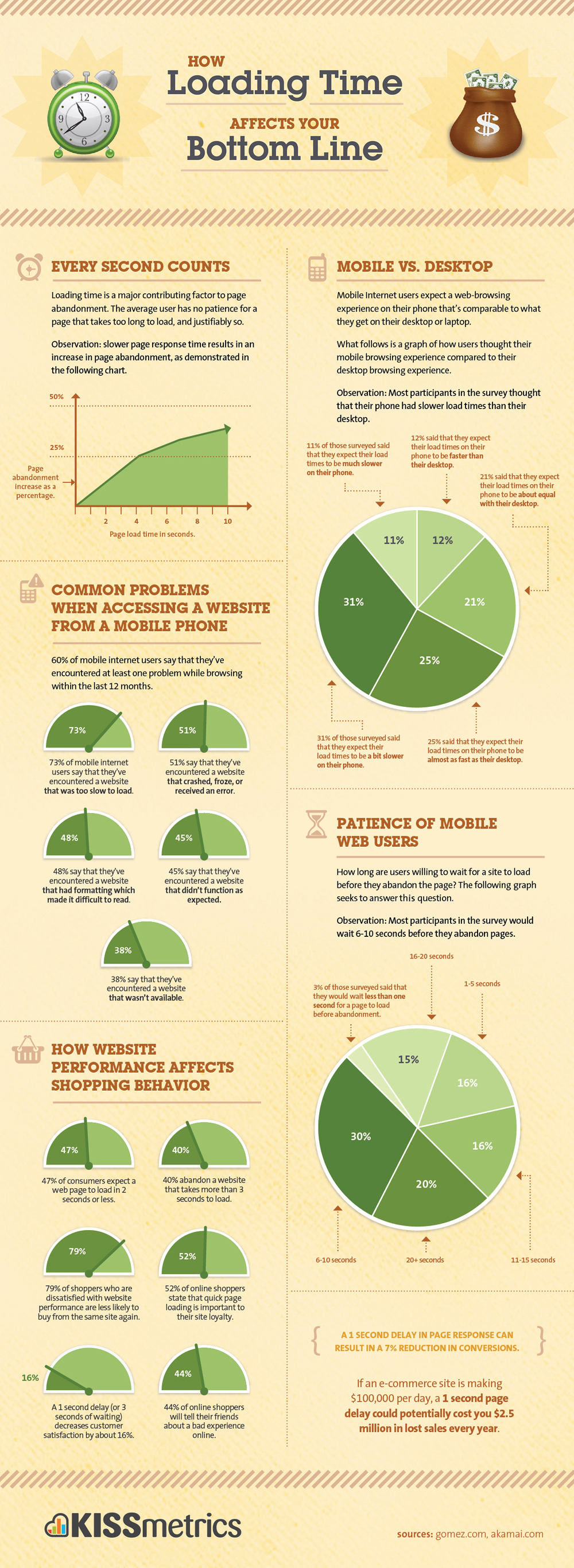
Bad performance ain’t gonna receive no applause, says Brad Frost. It all narrows down to how fast we can operate the website. High page loading times yield devastating results. KISSMetrics even created a great infographic showing you stats, which prove that a slow website equals death.

Jakob Nielsen speaks how responsiveness is a basic user interface rule that needs to be incorporated into every project you make. Do not forsake performance for the sake of aesthetics. Slow loading times and heavy websites are the first detrimental factors that people notice. Some long after the days of Flash websites, which showcased creativity under the principle “I can, so I will,” but it’s a pitfall.

Be creative and usable.

Everybody hates reading

Frank Gaine

What one UX mistake on websites drives you crazy?

I hate huge amounts of text without subheadings to summarize and divide up the text!

Since we rely heavily on the Internet nowadays, reading is an essential activity. Because of that, rules and guidelines were created in order to make that task as pleasurable as possible — especially since people scan instead of reading.

Some do employ them properly, but some forget that reading content should be optimized.

UXBooth tells you that most designers put visuals before the content itself, claiming it is destroying the value of the text. Later on, however, they advocate how both design and content can be optimized — the right way to go. By optimizing typography, text division, order, and many more you can deliver the most pleasant experience to your readers.

Content serves the web right now, so it is crucial to make it easy to digest.

If you want to go in-depth with optimizing your text, have a look at this amazing piece from Smashing Magazine telling you how to craft a perfectparagraph. We have been taught in our classes that paragraphs are the building blocks of every text, so let’s make sure that their quality is awesome, or else the whole thing shall crumble.

UX Movement shows how center alignment makes orphans and children cry, and they also advocate that you should get rid of orphans entirely (you know, those dangling pieces in the text, not real children).

Give people a nice read.

Your forms are out of form

Andy Budd from Clearleft

What one UX mistake on websites drives you crazy?

As a user I get really frustrated when overly enthusiastic form validation tells me a field is wrong when I know it’s right. This usually happens when I try to add an international prefix to a phone number, let’s say, but I’ve also had buggy validation tell me that my date of birth was wrong, which is especially annoying.

A related frustration is when the page refreshes and some of the information you previously entered has been removed and it’s not clear what’s actually causing the error in the first place.

I have no idea why so many websites neglect web forms and leave them completely not optimized when their business heavily relies on them. You work in eCommerce? Imagine having bad order and delivery forms — your conversion rates are going to hit the ground so hard your business will lose its balance.

Websites tend to lie to you that you need to undergo a “quick” registration process that will take only a minute, and 15 minutes later you still are trying to enter the right CAPTCHA at the end. Don’t forget about re-entering your password every time, because it resets for security purposes.

Soo, hunter2 is out of question?

Smashing Magazine comes to help with an extensive guide to optimizing your web forms. Once you focus on three basic aspects of web forms (Relationship, Conversation, Appearance), you can fully understand the core principles of successful form design.

There is one thing — check out this website focused on showcasing terrible forms on the Internet, BadForms. What I found curious is the fact that the category “Good Forms” is actually empty. Dear Internet, start optimizing your forms, thanks — Everyone.

If you are desperate to find out whether your forms are good, UsabilityTools offers comprehensive web form analytics.

Sign in? Sign OUT.

Molly Wolfberg from UX Sisters

What one UX mistake on websites drives you crazy?

When I have to go through too many clicks to sign in! there’s one banking site I use often, and I have to click THREE TIMES to even get to my login page. It’s awful! If you’re making people sign in to use your product, make it easily accessible!

Registering is a bane of many users. Not only registering should be quick and easy — signing in when returning to the service should be a breeze as well.

Do I hear faint “But it follows the 3-clicks principle…” in the background?No. The 3-clicks rule is an obsolete relic that only illogically shuts down any design-related debates. UX Booth orders you to stop counting clicks, as the amount of pages you need to go through is not the issue — the amount of effort required for each of them is.

Of course, the above is related to the browsing experience in general, but both the signing in and the general browsing face the same issue — being too strenuous for users. There are two solutions:

  • If signing in takes too much effort because of the clicks you need to make, simplify it.
  • If reaching information on your website can be done with two clicks, but requires tons of searching because of the abundance of tabs in the navigation menu, simplify it.

Generally, simplify it.

That does sound like a good principle, right? Let’s see the final point then:

Simplify

Heydon Pickering fromSmashing Magazine

What one UX mistake on websites drives you crazy?

Complexity is the most prolific enemy of good user experiences, blighting all kinds of users. Complexity is also one of the hardest things to fix after the fact.

The only way to “fix” complexity is to axe features, so being the anti-complexity tzar means telling people their work has to be destroyed. Not an easy job. Good planning and the willingness to say “no” in the early stages of a product’s life are the best way to reduce complexity.

Complexity is THE issue of all UX projects, and is one of the most common mistakes. Many designers don’t see that their project is overloaded with features, even though they are core elements. Being critical towards your own work is difficult, as removing one part causes others to crumble, and this is the scenario we need to change.

The philosophy of all modern projects gravitates towards this one rule — simplicity. UXMag speaks how hard it is to be simple. If you want to make it, try following 10 principles UXMag proposes. They advocate being focused, as that will lead you to a clear product. Smashing Magazine highlights many examples of changing projects by employing the rule of simplicity. The results are often immediately pleasant to the eye, proving that the results are there.

Remember — complexity is dirty. Clean it all up and make your projects simple.

Just one thing

Thanks to reaching out to UX experts, we could gather what actually bugs people on everyday basis. Some of abovementioned points appear to be painstakingly obvious — the question is why they still appear? The answer might be the fact that they became too integrated with most of the designs, and that forced us to get accustomed.

That is a terrible mistake.

Never get used to bad experiences. Do your best to deliver and demand the most pleasant UX possible. Do it for both yourself and for others.

Wireframes and Personas

Image: Gayatri S

Image: Gayatri S

These past few months I have had the opportunity to do freelance work with a few different agencies and have had wildly different experiences. One thing that becomes clear is that, while UX is a buzzword and many clients seem to want it, many agency heads (account executives) don’t really understand what it is. And now the buzzword has changed again: “Lean UX.” This makes it more complicated, because UX itself is so poorly understood that adding a modification complicates communication all the more. I’ll attempt here to clarify a bit.

“You do wireframes, right? Because our clients expect wireframes.”

One of the main obstacles facing many agencies incorporating UX into their process is the idea that design deliverables are the only evidence of billable time. I can’t tell you how many times I’ve been on a team of designers who worked hard to making an initial iteration of a comp pixel perfect; it’s the industry standard and clients rightfully expect it, especially with deliverables destined for print. When we apply this expectation to web work it makes less sense (browser and device differences being among the chief factors), and when applied to UX tools such as wireframes it makes none whatsoever. Since UX has popped onto the client radar, the expectation is that wireframes comply to the same exacting strictures as design deliverables.

This somewhat defeats the point of using wireframes at all, since if one is going to wireframe in Illustrator or Fireworks then one may as well be designing instead. Clients see these documents and focus on visual specifics rather than functionality. This also holds true to a lesser degree for personas and taskmaps, other crucial tools for a user experience designer. This is not to say that aesthetics are not a very important part of UX; they are, but they don’t apply to wireframes.

Wireframes function as a point of reference that will allow quick collaboration between the business strategist, the interaction designer, the developer and the graphic designer. they can come in different flavors from napkin sketches to fully interactive simulated sites. The idea is that you can test the way the interaction actually functions.


The great thing about using a tool such as Axure is that you can do a pretty good of showing how the site will actually function and be able to demonstrate and test it… all without needing to involve your development team. A wireframe interface  is easily modifiable, too. If something doesn’t work, it is easy to change it.

So what exactly ARE we delivering?

My experience has shown me that user experience design benefits from using a programmer’s mentality of asking first what it is we’re trying to do. As a UX designer, my questions are simple:

1. Who is the user and what are her priorities?
2. What does the user want when she uses this tool, website, or app?
3. What does the business want her to do?
4. What is the best way to address of these needs simultaneously?


Where do personas fit into this?

Right at the beginning, because personas are the tool that we use to keep us on track. But what are they?

First, what they’re not:

Personas are not a demographic. They aren’t  a segment or a group, though that’s where they start.  Really, a  persona is a fictional, yet accurate, depiction of an actual user. The goal of a persona is to humanize the target audience so we can better understand their motivations and behaviors and how they will interact with the interface. We need to know who these people are and what they want.

In reality, personas should be the locus of the entire development process because they ensure that we are designing for the user, not themselves. Personas will create alignment on this key point.

That’s all well and good, but how do we know? Often, businesses think they know their customer through and through. Often, they are wrong. They forget the all-important fact that they are not their customer.

Ideally, the process of creating personas typically begins with baseline demographic information that provides known demographic data with quantitative insights to identify core similarities and differences. This will divide the audience into segments.

Then, that information is sifted further by using third-party research tools to start identifying individual characteristics based on demographic and other factors.

Once the differentiating factors between the various individuals are fully identified, we are in the position to form some hypotheses about  our users. We might find that certain of them only interact with the site at night and draw some conclusions from that. These conclusions need to be confirmed of dis-proven by actually talking to real users. This can be done with surveys, emails or face-to-face interviews.

The final validation is achieved by conducting more extensive interviews with subjects who closely match the personas. Such individuals can also be used for user tests on existing interfaces for the purposes of auditing websites and competitor analysis as it affects the core of the target market.

The end result is typically three to five individual personas that I humanize. Each persona contains a name and picture along with an extensive background (including city, job title & salary, marital status, age, race, family, etc.), prime motivators, expectations, buying patterns, technology patterns, pain points, favorite brands…in short, a well- rounded look into the specific factors that may come into play when the user engages the product.

Realistically, this can’t always happen. In fact, I’d go so far as to say that only a tiny portion of personas are grounded in the kind of research that’s really required. It’s expensive and time-consuming and usually the client doesn’t want to spend for it because they believe that the research is enough.

It’s not, for one key reason:

Research is not a design tool. Personas are, and by using them in every case we ensure that we are not designing for ourselves. 

So what’s usually done are proto-personas.  These start with some quantitative research by marketing firms such as Forrester and are essentially fleshed-out versions of the demographic. In-house subject matter experts and business owners can help confirm hypotheses and help personalize the personas. I have found LinkedIn and my own personal network to be a great use in confirming a hypothesis that is shown in the big-picture research. Quick emails to people I know who match the target can help, as can a phone or face-to-face conversation. Most recently I was working on personas for a pool table manufacturer and talked about the tables with my barber, a pool enthusiast. There are ways to do that don’t involve the sticker shock of full-on process.

And getting 80% of the way there is a lot better than having nothing, or worse: a bunch of wholly fabricated stuff.


Adaptive vs Responsive Design

When I got my start in Web design back in the late 1990s, there were a lot of buzz words being bandied about by marketing and sales staff, words that they didn’t quite understand. This is the nature of marketing and sales, after all: promise, assure and close the deal. Unfortunately, I was always on the part of the team tasked with fulfilling the promises, and this didn’t always go as planned. The oft-quoted stale joke in those days was “The first 90% of the budget and time goes toward creating the first 90% of the code. The remaining 10% of the budget and time goes toward creating the other 90% of the code.”

Part of the problem is the inherent disconnect between what is promised and what is possible. You hear a lot about “best practices,” but really, what do they mean by that? Preferred practices? Profitable practices? The truth is that there really are a set of best practices, the determination reached by research, trial-and-error and real world experience.

One the latest of the buzzwords is “adaptive.” Another is “responsive.” As these two approaches cut directly across the UX hawse, I have been searching for a succinct way to describe these in terms that even an aggressive marketing guy can understand.

Igor Faletsky, CEO of Mobify, contributed a recent column to Wired’s Webmonkey that addresses this beautifully. I’ll include it here:

The Two Flavors of a ‘One Web’ Approach: Responsive vs. Adaptive

You’ve probably heard people say we’re living in a “post-PC world.” What does that mean for web developers? It means that 30% to 50% of your website’s traffic now comes from mobile devices. It means that soon, desktop and laptop users will be in a minority on the web.

How do we deal with this tectonic shift in user behavior? We’ve moved beyond the era of m-dot or t-dot hacks, into one where responsive and adaptive design techniques rule the day — what the W3C calls a One Web approach. The key part of the W3C’s recommendation is that “One Web means making, as far as is reasonable, the same information and services available to users irrespective of the device they are using.”

For developers that means that taking a One Web approach ensures that not only does your site work on the smartphones and tablets of today, but it can be future-proofed for the unimagined screens of tomorrow.

There are currently three popular approaches to developing a One Web site: using a responsive design; client-side adaptive designs; and server-side adaptive designs.

One is not better or worse than the other; each has its own strengths and weaknesses and the wise web developer will consider the benefits and drawbacks of each before picking the one that works for their next project.

Responsive Web Design

Responsive web design is the most common One Web approach. The approach uses CSS media queries to modify the presentation of a website based on the size of the device display. The number of responsive sites is rapidly increasing, from the Boston Globe to Disney to Indochino.

A key advantage of this approach is that designers can use a single template for all devices, and just use CSS to determine how content is rendered on different screen sizes. Plus, those designers can still work in HTML and CSS, technologies they’re already familiar with. Additionally, there’s a growing number of responsive-friendly, open-source toolkits like Bootstrap or Foundation which help simplify the process of building responsive sites.

On the other hand, there are few shortcuts to a sound responsive design. To go responsive, organizations often have to undertake a complete site rebuild.

The design and testing phase can be quite fussy, as it can be difficult to customize the user experience for every possible device or context. We’ve all seen responsive site layouts that look like a bunch of puzzle pieces that don’t quite fit together. Responsive web design works best in combination with a mobile-first approach, where the mobile use case is prioritized during development. Progressive enhancement is then used to address tablet and desktop use cases.

Performance can also be a bugbear for responsive sites. At Mobify, we recently completed an analysis of 15 popular responsive e-commerce sites. Among these sites, the home pages loaded an average of 87 resources and 1.9 MB of data. Some responsive pages were as big as 15MB.

The numbers are that high because a responsive approach covers all devices. Your user is only using one device, but they have to wait for all of the page elements and resources to load before they can use it. Put simply, performance affects your bottom line. On smartphones, the conversion rate drops by an extra 3.5 percent when users have to wait just one second. By the three second mark, 57 percent of users will have left your site completely.

While responsive design is fast becoming the de facto standard, it also creates new challenges for online businesses, including how to handle images, how to optimize mobile performance and often means sites need to be rebuilt from the ground up with a mobile first approach.

Client-Side Adaptive

Adaptive design builds on the principles of responsive design to deliver user experiences that are targeted at specific devices and contexts. It uses JavaScript to enrich websites with advanced functionality and customization. For example, adaptive websites deliver Retina-quality images only to Retina displays (such as the new iPad) while standard-definition displays receive lower-quality images.

There are two approaches to adaptive design — one where the adaptations occur on the client side, in the user’s browser, and another where the web server does the heavy lifting of detecting various devices and loading the correct template. Examples of client-side adaptive sites include Threadless and ideeli. One of the strengths of the adaptive templating approach is the ability to reuse one set of HTML and JavaScript across devices, simplifying change management and testing.

A client-side adaptive approach means you don’t have to rebuild your site from the ground up. Instead you can build on existing content while still delivering a mobile-responsive layout. For expert developers, this approach also enables you to specifically target particular devices or screen resolutions. For example, for many of Mobify’s online fashion retail clients, 95% of their mobile traffic comes from iPhones. Client-side adaptive means they can optimize specifically for Apple smartphones.

Unlike responsive design, adaptive templates ensure that only the required resources are loaded by the client’s device. Because device and feature detection is shifted to the mobile device itself, CDN networks like Akamai and Edgecast can use most of their caching functionality without disrupting the user experience.

The client-side adaptive approach has a higher barrier to entry than responsive design. Developers need to have a solid grasp of JavaScript to use this technique. It also depends on a site’s existing templates as the foundation. Finally, because the client-side adaptations are a kind of layer on top of your existing code base, you need to maintain them as your site as a whole evolves.

Server-Side Adaptive

We can achieve the server-side adaptive approach in a variety of ways, through server-side plugins and custom user agent detection. Sites that use server-side adaptive include Etsy, One Kings Lane and OnlineShoes.com.

Why choose server-side adaptive? It typically offers distinct templates for each devices, enabling more customization, and it keeps device-detection logic on the server, enabling smaller mobile pages that load faster. Additionally, there are numerous server-side plugins available for common CMSs and eCommerce systems such as Magneto.

This approach isn’t for the faint of heart–it typically requires significant changes to your back-end systems, which can result in a lengthy (and costly) implementation. The requirement to manage multiple templates raises ongoing maintenance costs. Finally, this approach can encounter performance issues when servers are under heavy load. When mobile user agent detection is performed on the server, a lot of common caching mechanisms deployed by CDNs like Akamai need to be turned off. This can result in a slower user experience for mobile and desktop visitors.

Of course, many companies are still wrestling with the basics of responsive, and they’re not ready to confront the more sophisticated flavors of adaptive. Increasingly competition and mobile traffic, however, will drive more and more organizations to kick the tires on all three approaches, and pick the one that works best for their users.

Thoughts on UX and the NYC Subway

Fig.-3-79-orig

I recently returned from a trip to New York where I had a chance to use the subway system pretty extensively. As a UX guy, I’m always looking for good user experiences in unlikely places. The subway system was a really good lesson, because it, like many of the projects I work on, has several elements that make the user experience particularly difficult to orchestrate. For starters:

  1. A huge variety of different users with an enormous range of priorities, skills and comfort levels
  2. A wide variety of different interfaces to choose from
  3. An environment that is often confusing with little consistency in feedback
  4. High penalties for mistakes
  5. Time constraints
  6. Support of legacy interfaces and environments

Let’s take a quick look at the first one:

1. A huge variety of different users with an enormous range of priorities, skills and comfort levels

On the same train I noticed students, parents with young kids, experienced (albeit jaded) subway commuters, shoppers, non-English speakers, homeless, teens, tourists, etc. Initially, they had the same general goal: go somewhere within the five boroughs. They walk down a flight of steps into the tunnel. After this, we begin what will be a lengthy process of divergence. As with any diverse user base, this gets very complex very quickly. For instance:

metrocard

This is the level of complexity before the user even enters onto the platform. They are just buying the card. Because you need a Metrocard to ride the subway, this is somewhat simplified (although there is a separate set of tasks specific to the machine).

At this point, we need to begin segmenting the users. Assume two main segments of commuter or tourist. What kind of commuter? Rush hour office? Student? Jazz musician carrying a double bass or a drum kit? And what kind of tourist? English speaker? City dweller from another urban environment? And with these users, what is the priority? A tourist may be in a hurry, or may be feeling panic because they feel unsafe. A commuter might be exhausted and afraid of falling asleep (and winding up in Coney Island, a not-uncommon occurrence.)

The solution to this complexity can be found in the way the way the fares are handled: find a way to meet as many needs as you can with a simple solution. The Metrocard machines take both credit cards and cash (bills and coins). They do not take foreign currency, although NYC is an international city and many foreigners use the subway. Nor are legacy currencies supported (such as subway tokens). There is no cash option at the gates, either. The majority of the users’ needs are met by making certain some constraints are universal.

Once on the train, we start seeing how the different user priorities begin affecting their actual experiences. Let’s take a short persona of a tourist as an example:

MILDRED AND JIM

  • From Topeka KS
  • Visiting daughter Emily in Williamsburg
  • Want to see the Statue of Liberty
  • Have been to NYC in the 1970s, but not since

Seeing this short persona set, we can surmise a few details about what their primary concerns might be:

  • Not from a big city, so they may be intimidated
  • Have an idea of what they want to do that is based on a preconceived idea
  • Previous experience of the city markedly different
  • Worried about safety
  • Worried about getting lost

Because they visited during a time when the subways were indeed dangerous, they may still carry this preconception with them throughout the experience despite the visual evidence to the contrary:

This is what they’re thinking

1CBXT

even though they actually see this:

So, there are some things that these users might want to see. Regular announcements of the stations, a clean and graffiti -free environment, easy-to-read maps… these would all go a long way to helping them overcome the preconceptions and make their experience more enjoyable and useful.

When we go back and look at our list, we find that these improvements go a long way toward addressing many of the concerns:

  1. A huge variety of different users with an enormous range of priorities, skills and comfort levels
  2. A wide variety of different interfaces to choose from
  3. An environment that is often confusing with little consistency in feedback
  4. High penalties for mistakes
  5. Time constraints
  6. Support of legacy interfaces and environments

The various users, of course, will need a rudimentary knowledge of English if the train information is verbal, but this could be remedied by a simple visual interface. Also, many of the riders wear headphones and need visual feedback. The visual display would need to be high enough so that even when the cars are crowded they remain visible. They need to be simple enough that anyone can understand them.

The current system is a mess, with a combination of maps, announcements (over bad speakers so garbled you can bare hear them), text displays that are great if you read English and… best of all… a simple route map with the stations plainly marked, lighting up as you go (the only drawback being that you can only see a few stations ahead and behind).

As always, it’s the understanding of the users’ needs and emotional context that will show the path toward a good solution.

Lastly, let’s not forget about this:

General content… is it necessary?

This is a reprint from an article in UX Magazine by . It raises some excellent questions about what I like to think of a the inertia of doing things the same old way. I have experienced a lot of frustration as a user because of the lack of attention to functionality and user needs.


This is settled law, right?

When designing a shopping experience for anything remotely complex, present the user with general information first, then help them dive into the details.

Well, something has been niggling at me over the last few months as Bolt | Peters has observed peopleshopping for furniture, laptops, enterprise software, audio equipment, clothes, cars, business course content, restaurant reservations… and probably a few other categories we’ve forgotten. Tons of users tell us they want to find general product information first when shopping, but when pressed on what that key general information is, none of it is actually general—not for one user among the hundreds we’ve spoken to. Instead, early-stage shoppers—those still assembling the 3-10 options of a consideration set—need specifics first, and specifics are often very hard to come by.

General information is that top paragraph people skip over and scroll by when looking for the specific details, which are usually placed at the bottom of the page. It’s often called an “overview,” and it’s usually found at the top of a product page, occupying prime screen real estate next to the main “hero” photo. Some of the words our research participants have used to describe it are “fluff,” “marketing,” and “bullshit.” Our clients usually call it “copy” or “description.” Another common location for it is on the default tab of a set of options below a summary graphic.

Take a look at these product pages for surfboards:

Web page for a surfboard displaying lots of general info and no specifics
Channel Islands Surfboards

This page starts with information about the company, then a paragraph of text that includes dimensions, descriptions like “performance hybrid design,” and brand names like “Double Helix technology.”

There’s no link to further specs at all. This is certain to be a frustrating page for any user who hasn’t researched the board thoroughly elsewhere.

Imagine instead if the page provided a single sentence of description, something along the lines of “Limited edition performance board, purchases benefit AIDS elimination in Africa,” followed by a clean, bulleted presentation of the dimensions, weight, materials, colors, appropriate wave conditions, the designer’s name, and how much of each sale goes to the charity. Then, under a separate heading (or even behind a link), the history of the company and some of the story of this special board could appear. This structure would support the user’s natural information-gathering flow.

Many product pages have similar problems and would be improved by equally simple changes.

Web page for a surfboard with a heavy emphasis on general info
Surf Industries

This one, too, dedicates a lot of space to telling the history of the design, and provides anchor links (in the blue nav bar at the top) to the dimensions and to download a PDF with detailed specs. It’s definitely better to have those available, but the extra scrolling and linking make it hard for a shopper.

Interestingly, there is a better page on this site, in the online store:

Web page for a surfboard that puts specifics before generalities
Surf Industries

This page presents specs at the top and description at the bottom in a reversal of the usual order. Details are scarce, though.

Web page for a surfboard with a balance of visuals, specifics, and general info
SurfTech.com

This similar one, while not necessarily an example of elegant visual design, provides a short, descriptive paragraph next to a few key specs. This is an excellent start, but it’s not clear where to find further details.

These issues exist across all product categories. For example, this page is for the latest version of Photoshop:

Adobe Photoshop information website
Adobe.com

It takes two clicks into the very quiet right-rail navigation to get to system specs and detailed information.

Or this one, for a dishwasher. Notice how scrolling past the paragraph of descriptive copy rewards the user with a long list of feature names, but it’s still one more click (for each feature!) to find out what it actually does. If a potential customer is trying to decide whether to include this model in the set of options they’ll share with their spouse, it’s a tedious process to get to that initial decision.

Whirlpool dishwasher information website
Whirlpool.com

Consideration Sets Explained

Consideration set is a term for situations in which a shopper isn’t sure exactly what he wants to buy—which hiking boots, which sci-fi novel, which cubicle system, which digital camera, which mid-size SUV. Undecided shoppers typically put together a shortlist of options that satisfy their most critical requirements before getting into detailed comparisons. It usually isn’t worth the effort to do serious research on hundreds or even tens of products, so shoppers need to come up with a reasonable number of ideas to look into more deeply. The number of items in a consideration set varies depending on the product and shopper, but most of the time it’s 3-10 possibilities.

This concept isn’t terribly controversial as far as I know, but developing a consideration set isn’t discussed much in shopping or search studies. And it should be, because the kind of information shoppers need to make decisions about whether something belongs in their consideration sets is not the type of information that’s presented on most online product information pages. General information won’t do the trick although, again, users will tell researchers that “general” is what they need. This is a classic user lie, because users aren’t consciously aware of this need in the abstract.

Here’s the tricky bit: if a researcher conducts a qualitative session with someone who’s not actually shopping at that moment (someone who doesn’t have a native task), they’re very likely to get positive feedback about the general information. “Oh this is great—an overview!” This is the user lie, and is really where Time-Aware Research earns it stripes. Bolt | Peters has seen plenty of instances in which time-related considerations have a big impact on user feedback. Someone evaluating tax preparation software will have less patience for reading general information two days before his taxes are due, and an IT manager trying to spend out the department budget before the fiscal year ends will want to skip straight to the details. Sometimes the last thing a person needs is a general overview.

Don’t Listen to the Lies. Give ‘Em Specifics.

What are users really looking for in early phases of the shopping process?

A couple of critical, deal-breaking details.

Every user is different, but many of these critical details are extremely specific, and users often don’t find this information on product landing pages—they have to dig into specs.

  • Does this car have a third row and does it come in a stick shift?
  • Is this piece of software going to be compatible with two others and is it in my approximate budget range?
  • Can I use generic memory cards for this camera?
  • Can I get this chair in a special height and does it offer a fabric upholstery option?
  • Does this dress have the right “vibe” I’m looking for?

Okay, that last one’s a bit of a red herring. In cases like fashion, the need for immediate detail is very well served by images. But in products that can’t be as easily represented by a photograph, the challenge is much harder.

Take, for example, two shoppers who are looking at the same camera model with very different needs in mind. Natasha wants a digital camera with a huge storage capacity and a sturdy exterior because she’s going on a long backcountry trip; Marco wants a camera capable of extra-high resolution and lens switching because he’s shooting for print. Unless they are new to photography, they have a pretty good idea of what they’re looking for and they know the major brands by reputation, at least a little.

So while both may be interested in the same model, when it comes down to it, the last thing Natasha and Marco want when they hit the product page is a brochure about the manufacturer or marketing language about what makes it a good camera. One user wants to know about the body specs, and the other wants to know about the resolution. And until they find that information, everything else is “fluff,” “BS,” or “in the way.”

Those words may sound harsh, but they came directly from the mouths of a few of the hundreds of users we’ve watched scroll irritatedly past carefully designed overviews and photo layouts. Most of the time, users have to scroll way down to the bottom of the page to find the details they care about. In some cases, they have to click into a second page. In the worst case, they have to download a PDF. Actually, in the very worst case (most commonly seen in enterprise software) they can’t get this detail without contacting a rep and formally entering the sales cycle. They often still find what they’re looking for and if they’re highly motivated they’ll put up with the hassle, but they don’t understand why it has to be so hard.

I’ll underline that point: if users are highly motivated they’ll put up with the hassle, but users are typically not highly invested in a particular product or brand before the consideration set has been assembled. Natasha and Marco are much more hassle-sensitive right now than in later decision stages. They’re correspondingly more likely to abandon research on a product (and thus leave it out of their set and their eventual purchase decision) if it requires extra effort to find key specifics. Designers of product pages could greatly enhance the user experience and conversion rates by incorporating as many details as possible into the main body of project pages, and providing easy access to more.

But Don’t Completely Ditch the General!

Somewhat counterintuitively, Bolt | Peters research has found that users are more receptive to brand and marketing information for items that are already part of the consideration set. Once they’ve done their check and verified that the desk chair comes in red and has a seat-tilt adjustment, it’s useful to know about the company’s philosophy, especially if they’re now going to need to convince someone else about the purchase. In fact, those elements may be critical to the final decision, but they don’t help companies that don’t make it into the consideration set in the first place.

So what to do? Don’t take strong images off product pages, but do flip the traditional model on its head a bit. Give more focus at the top of the page to specs, and less to descriptive copy. Above all, make easy access to the nitty-gritty details a top priority, and don’t assume that any detail is too specialized to need that easy access. If it’s part of the product, it’s probably important to some shoppers. At the end of the day, if users leave a site having quickly found the details they’re looking for—even if the result is that they now know the company doesn’t have what they’re looking for—the company gains credibility. And if the company does have what they’re looking for, they’ll know it and will add that company’s product to their consideration sets, which is, after all, the only way to get them eventually to convert.

UX is NOT…

This is repost of an article by Whitney Hess, one of the pioneers of the UX movement

When I tell people that I am a user experience designer, I usually get a blank stare. I try to follow it up quickly by saying that I make stuff easy and pleasurable to use. That’s the repeatable one-liner, but it’s a gross oversimplification and isn’t doing me any favors.

The term “user experience” or UX has been getting a lot of play, but many businesses are confused about what it actually is and how crucial it is to their success.

I asked some of the most influential and widely respected practitioners in UX what they consider to be the biggest misperceptions of what we do. The result is a top 10 list to debunk the myths. Read it, learn it, live it.

User experience design is NOT…

1. …user interface design

It’s not uncommon to confuse “user experience” with “user interface” — after all it’s a big part of what users interact with while experiencing digital products and services. But the UI is just one piece of the puzzle.

“Interface is a component of user experience, but there’s much more,” says Peter Merholz, founding partner and president of Adaptive PathChristian Crumlish, curator of the Yahoo! Design Pattern Library, explains that design “isn’t about cosmetics, pixel-pushing, and button placement. It’s holistic and it’s everyone’s concern, not just the realm of ‘artistic’ types.”

Dan Saffer, founder and principal at Kicker Studio, agrees that it’s common for design to be mistaken for being solely about decoration or styling. “I’ve had clients tell me not to worry about what their strategy is,” he says, “because why would a designer care about that? UX is more than just skin deep.”

2. …a step in the process

It is the process. In order to create a great experience for your users, not just design something that we’d like to use, we need to keep listening and iterating. It doesn’t have to be a rigid process, but it does need to exist.

“User experience design isn’t a checkbox,” says Liz Danzico, an independent user experience consultant and chairperson of the new MFA in Interaction Design program at the School of Visual Arts. “You don’t do it and then move on. It needs to be integrated into everything you do.”

Dan Brown, co-founder and principal at EightShapes notes, “Most [clients] expect experience design to be a discrete activity, solving all their problems with a single functional specification or a single research study. It must be an ongoing effort, a process of continually learning about users, responding to their behaviors, and evolving the product or service.”

3. …about technology

User experience isn’t even about technology, says Mario Bourque, manager of information architecture and content management at Trapeze Group. “It’s about how we live. It’s about everything we do; it surrounds us.”

faucetLike a painter uses paint to communicate concepts and emotions, user experience designers use technology to help people accomplish their goals. But the primary objective is to help people, not to make great technology.

“User experience design is not limited to the confines of the computer. It doesn’t even need a screen,” argues Bill DeRouchey, director of interaction design at Ziba Design. “User experience is any interaction with any product, any artifact, any system.”

Really, a user experience designer could help to improve a person’s experience with just about anything — a doorknob, a faucet, a shopping cart. We just don’t typically refer to the people using those things as “users,” but they are.

4. …just about usability

“People often think that [UX design] is a way to make products that suck into products that don’t suck by dedicating resources to the product’s design,” says Chris Fahey, founding partner and principal of Behavior. Making stuff easy and intuitive is far from our only goal. In order to get people to change their behavior, we need to create stuff they want to use, too.

David Malouf, professor of interaction design at Savannah College of Art & Design, explains that “while usability is important, its focus on efficiency and effectiveness seems to blur the other important factors in UX, which include learnability and visceral and behavioral emotional responses to the products and services we use.” Not everything has to be dead simple if it can be easily learned, and it’s critical that the thing be appealing or people might never interact with it in the first place.

“Usability is not a synecdoche for UX,” asserts Will Evans, principal user experience architect at Semantic Foundry. He points to Peter Morville’s UX honeycomb, which in addition to usable, recognizes useful, desirable, accessible, credible, findable, and ultimately valuable as the essential facets of user experience.

5. …just about the user

consumerRuss Unger, experience design strategist, likes to say that the biggest misconception of UX design is the “U.” “There are a set of business objectives that are needing to be met—and we’re designing to that, as well,” he explains. “We just can’t always do what is best for the users. We have to try to make sure that we are presenting an overall experience that can meet as many goals and needs as possible for the business and the users.”

As user experience designers we have to find the sweet spot between the user’s needs and the business goals, and furthermore ensure that the design is on brand.

6. …expensive

Every project requires a custom-tailored approach based on the business’s available resources, capabilities, timeline, and budget, and a whole slew of real-world constraints. But that doesn’t always mean that it needs to be costly or take forever.

Steve Baty, principal and user experience strategist at Meld Consulting, combats the fallacy that UX design adds too much time to a project. “Sometimes a fully-fledged, formal UCD process may not be the best thing to try first time,” he says. “It’s extremely important – and totally possible no matter where you’re working or when you arrive on a project – to make small improvements to both the project and the product by introducing some user experience design techniques.”

“People cling to things like personas, user research, drawing comics, etc.,” notes Saffer. “In reality the best designers have a toolbox of options, picking and choosing methods for each project what makes sense for that particular project.”

7. …easy

Just because we know how to conduct some cool and useful activities and you know your business really well doesn’t mean that this whole process is a breeze. And cutting corners on some important steps is a recipe for disaster.

Saffer maintains that a misconception “as common among designers as it is among clients, is that there is one secret method that will solve all their design problems.”

A trap that a lot of companies fall into is in thinking that they are their own end users. Erin Malone, principal atTangible UX, finds that both product managers and programmers believe they will create the experience as they build it. “UX designers are caught in the middle trying to speak the business language and the developer language to justify why we need to do our jobs and why it’s important to success.”

If you make assumptions about the people you expect to use your product or service — who they are, how they behave, what makes them tick — you’ll probably always be wrong. But take the time to get to know them, and hire the appropriate person to facilitate the process, and you can ensure you’ll get it right.

8. …the role of one person or department

workspaceUser experience designers are liaisons, not subject matter experts, doctors or any type of magical beings. We don’t have a set of best practices that we can robotically implement, nor do we have all of the answers. Our greatest skill is that we know how to listen. While we can help evangelize the most effective process within your organization, it’s ultimately up to all members of the business to make it a success.

“User experience isn’t just the responsibility of a department or a person,” says Livia Labate, principal of information architecture and user experience at Comcast Interactive Media. “That compartmentalist view of UX is evidence that it is not part of the organizational culture and hints to teams not having a common goal or vision for the experience they should deliver collectively.”

Malone highlights the fact that there are many different breeds of practitioners that fall within the user experience umbrella. “We, as an industry, have not done a good job of separating out specialties and roles with enough unique language so that clients and businesses get that they need to hire (on staff or consultant) different types of people at different points in a project lifecycle.”

9. …a single discipline

The truth is that we’re all still very new at this. Louis Rosenfeld, publisher at Rosenfeld Media, publishing books on user experience design, and co-author of the seminal 2002 book Information Architecture for the World Wide Web argues that user experience may not yet even be a discipline. “It may not even be a community just yet,” he asserts. “At best, it’s a common awareness, a thread that ties together people from different disciplines who care about good design, and who realize that today’s increasingly complex design challenges require the synthesis of different varieties of design expertise.”

We have proliferation of nebulous titles: information architect, user experience architect, interaction designer, usability engineer, design analyst, and on and on. And they don’t mean the same thing to every person or company.

Different people specialize in different parts of the process. Some UX practitioners focus on a specific technique, like Indi Young and mental models, or a single challenge, like Luke Wroblewski and web forms, or a focused activity, like Steve Krug and usability testing. Just like you wouldn’t go to a cardiologist to heal your broken foot, don’t expect any professional in the realm of user experience to accomplish everything you need.

10. …a choice

For those of you who think you don’t really need a user experience designer, keep this in mind: “Nobody wants to believe that what they are offering is of poor-quality or deficient,” says Kaleem Khan, an independent UX consultant, “because nobody sets out to achieve a bad design as a goal. It’s always a risk. Bad designs and bad experiences happen.”

Jared Spool, founding principal and CEO at User Interface Engineering (UIE), the world’s largest usability research firm, has done extensive investigation on the qualities of the satisfied and successful product teams. Simply put, the most common flaw he has found is that companies think “good experience design is an add-on, not a base requirement.”

Josh Porter, formerly of UIE and now principal at Bokardo Design, echoes Spool when he says, “The biggest misconception is that [companies] have a choice to invest in their user’s experience. To survive, they don’t.”

There are plenty of amazing practitioners who can help right in your local area. Check your local chapter of theInformation Architecture Institute (IAI), the Interaction Design Association (IxDA), or the Usability Professionals Association (UPA), or just find someone on LinkedIn.

Looking forward

20092009 is going to be a year of scaling back, but let it also be a call for pragmatism. It’s time to adopt more streamlined, smart, progressive and effective practices. We’ve reached a level of technological maturity where functional just isn’t good enough.

It’s how we engage people and the respect and value we provide to them that will separate the wheat from the chaff. Which side will you be on?

When User Interfaces Fail

I came across this today, and rather than paraphrase or link to it I thought I’d just paste it in (credit and link included.) This was done in 2004, the stone age of UX. I recall trying to convince huge companies that user experience went far beyond usability and was absolutely necessary. Unfortunately, these entreaties fell on deaf ears since the then-largest company in the world didn’t give a hoot about usability. And where is Microsoft now? Apple proved it… UX and CX can turn the fate of a company around. Facebook, which differed from MySpace in its interface inflexibility (no custom pages, whereas MySpace had all sorts of customization options), triumphed with its emphasis on functionality and immediacy. Any thoughts?

Some people like to do “designer bashing” from time to time. I was just in the mood to do some “developer bashing” today.There are a number of reasons why user interfaces of many software packages fail. I assume (slightly unfair and inaccurate), that in many cases there is no interface designer involved with user interface development, but rather the interface is designed by the application developers.


Here is a list of (some) common fallacies of some developers in regard to user interface design:

Fallacy #1: User centered design approach is optional.

Some developers actually have no idea what “user centered” actually means (as many consider the implementation of software that users can interact with already as being “user centered”). Also, the most important aspect of user centrism to developers is the feature list, because the features describe what the user could do. The actual ability is a function of a) the features and b) the capability of the user. What is not agreed on many times is that “capability” is not solely an attribute of the user, but is constituted by user experience level plus interface design. The 80/20 rule is applied as 80% application development and 20% interface development instead of the other way around (and in the order “first interface then application”).

Fallacy #2: Features are more important than usability.

For some developers the loss of features during planning phase seems to be a too big tradeoff in comparison to a “minimal” usability improvement.

Fallacy #3: “Design” is just an emotional and subjective quality.

Some developers think a “design” will just become necessary if the application should not only work, but also please and delight. While “likeability” is an important aspect, it is heavily underestimated how much users dislike software that is hard to use.

Fallacy #4: Functionality is what the user could do.

Some developers consider “functionality” being an aspect of the software. In fact “functionality” is an attribute only present in the usage context – where the user is the most important variable. Functionality is not what the software provides, but what the user is able to use. Microsoft Word may have many thousand functions which most users are unable to use. So the functionality of MS Word for users is what they can actually (and not potentially) achieve.

Fallacy #5: Personal experience is the best advisor.

Some developers often think they are able to do “cognitive walkthroughs” on behalf of unexperienced users. While this is a possible approach, many developers (that usually are power users with deep knowledge about the application) do not go far enough when defining “unexperienced”. When doing cognitive walkthroughs many developers keep the same mindset about what is important inside the application. Really unexperienced may consider completely different things as being important.

Fallacy #6: Good application design is the primary determinator for good interface design.

Most developers are interested in designing the application (that’s why they call themselves “developers”). Interface design is an uncomfortable requirement to be added to the application design. While there is much truth in the idea, that well designed applications often offer cleaner approaches to interface design, it is a false conclusion, that a well designed application will necessarily lead to a good user interface.

Fallacy #7: It’s OK to reject major changes of the application for minimal interface design improvements.

Well, sort of. Most of the time it is basically a matter of a wrong design approach in the first place. There is also a persistent understanding of developers that interface design issues do not interfere with the deeper application design – which is simply ignoring the fact that in most cases it remains to be the case.

Fallacy #8: A bad user interface alone cannot set the seal on the fate of the application.

It seems to be irrational to developers to prefer going with no software and unresolved problems instead of trying to work with a hard-to-use application. Unresolved problems can often be deferred or ignored – or – other workarounds could be tried with an easier path to a less optimal solution.

Penguin is your new taskmaster.

In 2011, Google released a series of algorithm updates called Panda designed to downrank websites providing poor user experience. Panda observed how users moved through sites by following the logic used by Google’s team of testers. It is, for all practical purposes, an artificial intelligence that ranks sites based on usability (and it’s named for its creator, Navneet Panda, and not the non-bear).

It gets better. In April of this year, Google released Penguin, an important algorithm change that targets web spam. When it finds it, Penguin decreases rankings for sites violating Google’s quality guidelines. You see, sites using black hat SEO tactics like keyword cramming have been junked for years now, but less obvious tactics such as including non-related links in content in an effort to drive traffic to specific sites have been getting past previous algorithms . The result has been shady SEO companies getting results with crappy non-content. The result has been more garbage and less useful information.

penguin_imageThankfully, those days are coming to an end.  Penguin is designed to detect shady techniques and flag sites found using them. You do it, you get warned. You keep doing it and you are out of the club for keeps.

Google says:

Sites affected by this change might not be easily recognizable as spamming without deep analysis or expertise, but the common thread is that these sites are doing much more than white hat SEO; we believe they are engaging in web spam tactics to manipulate search engine rankings.

 How can you tell if you’re violating the rules?

They key to finding out how this affects your site is Google’s Webmaster Tools. It is highly advisable that site owners monitor their Google Webmaster accounts for any messages from Google warning about past spam activity and a potential penalty. Penguin has impacted about 3.1% of queries (compared to Panda 1.0’s 12%).

Penguin downgrades sites for:

  • Excessive link building with no regard for quality
  • Deceptive doorway pages
  • Lots of keyword stuffing
  • Publishing lots of meaningless content just to get traffic from search engines

This is good move because it will break the endless self-referential SEO efforts linked blogs and canned articles about SEO. Gaming the system in that way will no longer be valuable because Penguin will detect and downgrade sites that do this.

Not to say that in service of this there hasn’t been some collateral damage. Google states that the Penguin update has affected a small percentage of websites, but many Google-centric SEO operations have felt the sting of the re-ranking and have taken a hit. One could surmise that these were the very firms that were causing the problems in the first place with dubious SEO techniques, but who can really say?

This is obviously the wave of the future. Google’s algorithms will be copied by other search engines and improved, artificial intelligence methods will be refined and the methodology of user experience will get better and better. The quick and dirty SEO for SEO’s sake is on its way out. The only thing that will save you: value. Value means quality content and relevant links. Value means ranked authors, recommended articles and legitimate social media linking. Value means that the media will have to have real, validated content.

The first step: write well and write often.

Despite the recent incursion of streaming media, the web is still very much a text-based delivery system. Good writing will always be better than poor writing, if for no other reason than it’s easier to understand. Writing that is done simply to improve search engine rankings is pretty awful, and in the end it is of no value whatsoever. Robo-generated SEO articles are fading fast, and rightly so. This is a boon for people who actually know how to write, and ever better for ones who know what they are talking about.

With each new update, Google is promoting content that really deserves its place in the ranking index. Nonsense content that has been juiced up with keywords will hit the round file, and the URL that carries it will be right behind.

So what is effective writing? Well, grammar is helpful. Wit is also appreciated, but the greatest thing is clarity. Be clear, be logical… and for God’s sake, be brief.  A few tips:

  • Be smart about keywords: Copy  that has been “optimized” by larding every sentence with keywords not only is hard to read, it triggers Penguin’s spam  sensors. Don’t randomly insert the keywords just for the sake of bringing up density. It doesn’t work anymore and was always uncool anyway.
  • Write for your audience: Cracked magazine is a great example of this, as is The Onion. They know what sort of things their readers like and will share socially. If you write for business, use a businesslike tone and write stuff that is pertinent. You can still have personality, but remember that excessive wisecracking in the boardroom is not a good idea if you wish to be taken seriously.
  • Make yourself useful: People use the web as a device as much as a diversion, and if they are going to the trouble to read your writing you owe them some solid information in exchange. The reader gives you their time, so you need to honor that and give them useful information in return.
  • Create content for other websites and blogs: Prepare an editorial calendar for writing articles and guest blog posts that can be published on websites and blogs other than your own. This helps you gain new exposure and earn quality backlinks . Choose appropriate and trusted venues and have at it.
  • Ask questions: If you can generate user responses in the comments, if you can get social media linking, if you can get the conversation started… well, then, the world is your oyster. Comment threads are todays new forums, but that doesn’t mean that forums aren’t alive and well. LinkedIn has a ton of great, business-centric forums that welcome civic discourse. People rely on them for information, and regular contributions can only improve you and your site’s reputations.
  • Create downloadable newsletters and ebooks: When building out landing pages with conversion as the goal, it’s important to give the reader something in return. Regular newsletters are fine, but you can one better by including a variety of pertinent content for readers. Graphs, charts, how-to articles, tips and tricks and other standbys are great content and are always popular. Just be careful that if you use somebody’s original work that you get their permission and give them credit. We are all in this together.
  • Utilize your analytics: Remember, we’re talking the web here so analytic are everything.  If properly set up, you can immediately tell what’s working and what isn’t. Conversion is the watchword for landing pages, so keep a close eye on which conversions are working. Nobody is filling out the form? Take a look and see if you have clear calls to action on the page. Check to see that the form isn’t too long. Make use of landing pages to really promote what you’re offering.


Once you are able to establish a good audience, you will find them to be a loyal group. I have several blogs I read every week because I enjoy the writers’ style and personality, and also because the information is usually valuable. Try it yourself and see. It’s not like Google is giving you a choice here.

What the heck is CX, anyway?

Customer Experience, or CX,  is the study of how customers relate to brands, products and businesses on emotional level. It’s being hailed as a “new discipline,” but CX has been been around a very long time.

Take, for example, department stores. These early pioneers of customer experience found that displaying their goods in a beautiful environment did more than merely showcase the wares; opulent surroundings made the customers behave differently. If   a customer was  in a palace, that customer was likely spend more money… and enjoy himself or herself doing it.  Because of this discovery, department stores came to resemble miniature palaces and offered generous credit terms and liberal return policies to facilitate liberal spending.  Increased competition also spurred the merchants to offer various premiums, some of which are still enjoyed today. Where would Christmas be without the Macy’s Parade or the ubiquitous depart store Santas? You can see customer experience alive and well in any men’s department that is decked out with wood paneling and armchairs. Although Nordstrom and Nordstrom Rack sell identical merchandise, the Rack’s warehouse-like environment conveys none of the branded splendor experienced in the flagship stores. These stores function as a semi-branded clearance outlet, offering a deliberately shabby customer experience that drives home the emotion message that the shopper is getting a great deal. It’s still Nordstrom, but a cut-rate one.

These stores learned, too, that loyalty could span generations and affect whole families. My grandmother knew certain New Yorkers more divided by the Macy’s vs. Gimbels  rivalry than by politics. You could forgive Uncle Herbie for being a Communist, but not for shopping at Macy’s.

The auto industry knows something about opulence and brand identity… make the customer feel like a big shot and suddenly price is not as much of a factor. General Motors knew this when they began buying up small, independent manufactures and rolling them under the same umbrella. A man’s first car is a Chevy and his last is a Caddy. Brand loyalty for a lifetime… or longer. You are what you drive, and money is only one of the considerations. This became all the more prevalent with the immense profitability of auto financing options.

Customers are loyal to brands they value. And value is far, far more than cost. It’s more than build quality, it’s more than materials. Value is, in essence, an emotional satisfaction of money well spent. Value is a “tangible intangible.” You know value when you see it, and the owners of brand names will go to any lengths to protect that value.

Restaurants, too, have long championed customer experience. Food, location, décor and service all play important roles in whether or not a restaurant succeeds, but there are often other intangibles at work.  Loyal restaurant customers will endure long lines, poor service and wrong orders if they perceive that experience of dining there is valuable. Sometimes  that can be because of a good review, but more often it’s word of mouth from other customers who have crossed over from loyalty to sheer evangelism. Food is food, but some experiences are more valuable than others. Anyone who has dined at an exclusive Manhattan restaurant will tell you the same.

But some restaurants have wild success while many others fail. (While not nearly as drastic as is commonly believed, 65% of new restaurants fold up within three years of opening.) The food may be equally good, the staff equally efficient, yet one place will thrive while another shutters. It certainly isn’t because the owners want to fail, nor is it because they are unwilling to give the customers what they want.

It’s because they simply don’t know. Customers will stop coming in, and the reason will elude the owner all the way up to the bitter end. It may be the parking lot, it may be the bar. By the time the owner starts wondering, it is often too late. The point is: if you don’t pay attention, you won’t know that you are failing until you fail.

Let’s take the greatest success story in recent years as a case study. You know who I mean: Apple. Apple did the impossible and not only came back from near extinction, but did so in a market that was completely dominated by a competitive monopoly. It achieved this through its innovative use of customer experience management. Every aspect of the Apple customer experience was designed and refined, from the screws used on the computer cases to the online store, from the type of metal on an iPod to the color of glass in the windows of the Apple Store. Steve Jobs was known as a detail man, but more importantly he was fully aware that attention to detail alone was not enough; it was absolutely vital to determine what the customers felt about the products. Jobs knew that emotions can overrule almost any other aspect of human interaction, even when it comes to technically-oriented decisions such as buying a computer or music player.

In an upcoming article I will address some of the “touch points” that can be monitored and refined to help improve your customers’ experience both on your website and your physical store. In the meantime, feel free to contact me at josh@grapnel.net with any questions or comments. You can also read a bit more about this at http://grapnel.net/cx.html

Whither WordPress?

I have been using websites as diaries for a very long time… far longer, in fact, than has been practical. I used to hand-code my journal entries in html and then upload them onto the uberhaus.com site almost every night. It was a laborious process, but I got a lot of satisfaction from it. Bear in mind that this was in 1997, the real “olden days” when we thought the world was going to change and everything would be free and open and computer monitors looked more like console TVs than what we have today. (Grapnel’s Bryan White actually was far ahead of the curve, coding a pioneer blogging CMS 1n 1998 for his site Disturbance–but that’s another story).

1997 was the year in which Evan Williams coined the term “blog” and came out with his content management system, Blogger. Anyone could post an online journal, and no coding was required. No HTML. No FTP. It was free, too, so suddenly, everybody with an opinion was willing (if not able) to write their every thought and feeling that would (hopefully) be read by countless millions. Or at least a few dozen, for Blogger had a very loyal community in its early days, and the golden rule was pretty universal. Blog unto others and they will blog unto you. Most of the early bogs were pretty forgettable, and the writers abandoned them after a while. The graveyard of dead websites is well-populated with orphaned blogs.

Still, the standouts developed huge followings, and what we now know as social media was born. Movable Type and TypePad followed in Blogger’s stead, and a real industry began taking off. Blogs became a legitimate (if not accurate) news source, and the advent of the more immediate platforms of Facebook, Twitter and their ilk only spread the influence.

So where did WordPress come in?

One of the more successful early entries was B2, an open source content management system that utilized PHP and mySQL in a slick combination that allowed users to customize the look and feel of their sites without sacrificing functionality. However, you had to know what you were doing, so much of the non-technical bloggers were stuck with limited customization.

Then, in 2003, a “fork” of B2/Cafelog was released by a couple of guys named Matt Mullenweg and Mike Little. They called it WordPress. WordPress was different because it included not only a user-friendly content management system but also a plug-in architecture and template system. Now non-technical users could not only choose how their site looked; they could decide how it WORKED.

And that’s not all. Remember, WordPress was (and is) open source. That means anyone could develop for it. Designers. Programmers. Marketers. Yep. I said marketers.

You see, WordPress is much more than a blogging system. It is a rethinking of the way in which websites are constructed. It is truly modular, allowing specific selection of elements based on whatever criteria you set up. Mobile site? Done. SEO heavy? No problem. Landing pages? Yes indeed.

You see, WordPress doesn’t just separate the content of a website from the presentation (a standard website best practice for many years). WordPress is completely modular: every element of the site can be separately controlled and modified without affecting the site as a whole. You can have one set of content with multiple creators and editors that is automatically delivered to users in the format they need at the moment, be it an iPad or a 72″ flat screen monitor. It can be used for commerce, for presentation, for data display, as a gallery, as a projector… pretty much anything you can think of.

And because it’s open source, there are literally hundreds of new plug-ins every week, not to mention a huge array of themes and designs. Many are free, but some of the more advanced components can get expensive (but still a fraction of the cost of custom development). Bryan and I have been involved in all kinds of installation of WordPress from huge multi-pronged sites to simple blog/portfolios.

If you’re interested in weighing the pros and cons of a WordPress installation, feel free to drop us a line. We’re happy to answer any of your questions.